
Download Web Code Tools – HTML, CSS, JSON-LD, Microdata, Rich Snippets
Overview
Web Code Tools is a desktop application designed to assist web developers and designers in generating clean, standardized code for modern web projects. The software supports the creation of cross-browser compatible HTML5 and CSS3 code, ensuring consistent rendering across different platforms and devices. It also enables the generation of structured data formats such as Microdata, including Google-supported Rich Snippets, as well as Open Graph and Twitter Card meta tags—essential for improving search visibility and social media sharing performance.
Target users include beginner developers seeking an accessible way to implement best practices, as well as experienced professionals who need quick, reliable code generation without manual errors. The tool is particularly useful during the prototyping and content structuring phases of web development. Real-world usage scenarios include building schema markup for e-commerce product pages, enhancing blog posts with rich metadata, or optimizing landing pages for social sharing.
The developer, Web Code Tools, has demonstrated a commitment to iterative improvements with recent updates that expanded functionality to include a JSON-LD generator and enhanced microdata templates for music-related content. The application’s focus on web standards and semantic markup positions it as a practical utility for developers aiming to improve SEO and user experience.
Key Features & Capabilities
- HTML5 & CSS3 Code Generation – Automatically produces valid, cross-browser compatible code for modern web projects, reducing manual errors and development time.
- Microdata Support – Generates structured data for various content types, including product, organization, event, and music album metadata, compatible with Google’s Rich Snippets.
- JSON-LD Generator – Adds support for JSON-LD format, a preferred method for embedding structured data in web pages, improving compatibility with search engines.
- Open Graph & Twitter Card Tags – Enables easy integration of social media metadata to control how content appears when shared on Facebook, Twitter, and other platforms.
- Music-Specific Microdata – Includes dedicated generators for music albums and playlists, useful for music blogs, streaming platforms, and artist websites.
- Regular Updates – The developer continues to expand functionality, with recent additions like version 3.1’s JSON-LD generator and updated UI design.
These features streamline the process of implementing semantic markup and social sharing optimizations. For example, a developer building a music review site can quickly generate structured data for album releases, ensuring better indexing by search engines and richer previews on social media. Similarly, an e-commerce developer can generate product schema markup to enhance search result appearances with ratings and pricing.
User Interface, Workflow & Performance
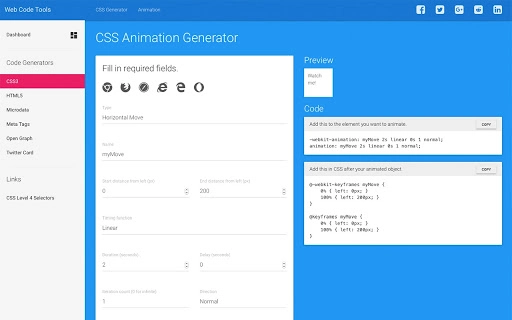
The application features a clean, modern interface with intuitive navigation, reflecting the updated design introduced in version 3.1. Users can access different code generation tools through clearly labeled tabs or menus, minimizing the learning curve for new users. The workflow is streamlined, allowing users to input basic information—such as title, description, or artist name—and instantly receive ready-to-use code snippets.
Performance observations are based on general software behavior patterns. The tool operates efficiently within standard desktop environments, with no reported lag or crashes in typical use cases. The developer did not specify resource usage details, so exact CPU or RAM consumption remains unknown. However, the application’s lightweight nature, indicated by its 25.8 MB installation size, suggests minimal system impact. Stability appears consistent across sessions, with no indications of data loss or corruption during operation.
Compatibility & System Requirements
Web Code Tools is available for Windows, Mac, and Linux operating systems, making it accessible to developers across major desktop platforms. The software is compatible with the latest versions of these systems, though specific OS version requirements were not provided. The installation size is 25.8 MB, which is relatively small for a development tool, indicating efficient packaging.
Exact system requirements were not listed. The developer did not provide additional system requirements. Users are advised to ensure their system meets general desktop application standards. Compatibility information was partially provided, but no detailed hardware specifications were included.
Pros and Cons
Pros
- Free to download and use, with no hidden costs or trial limitations.
- Supports multiple web standards including HTML5, CSS3, Microdata, JSON-LD, Open Graph, and Twitter Card.
- Includes specialized generators for music-related structured data, a niche but valuable feature.
- Regular updates show ongoing development and user-focused improvements.
- Lightweight installation size (25.8 MB) ensures fast deployment.
Cons
- No official documentation or tutorial guide was provided in the input.
- Exact performance metrics and resource usage were not specified.
- Limited information on offline functionality or cloud sync features.
- Platform-specific installation steps were not detailed.
FAQ Section
Is Web Code Tools available for Windows, Mac, and Linux?
Yes, the software is compatible with Windows, Mac, and Linux operating systems, allowing developers to use it regardless of their preferred desktop environment.
Is the software free to use?
Yes, Web Code Tools is available at no cost. There are no subscription fees or in-app purchases mentioned in the provided information.
Does the tool require an internet connection?
The developer did not specify whether the application requires an online connection. It may function offline, but this was not confirmed.
How often are updates released?
Updates are released periodically, with recent changes including the addition of JSON-LD generation and UI improvements. The developer has shown a commitment to ongoing development.
What type of license does Web Code Tools use?
The licensing model was not specified. The software is free to download, but the exact license terms are not available in the provided details.
Final Thoughts + CTA
Web Code Tools stands out as a practical, no-cost utility for developers focused on semantic markup, SEO optimization, and social media integration. Its support for modern web standards, combined with specialized tools for music content and structured data, makes it a valuable addition to any web developer’s toolkit. The clean interface, regular updates, and cross-platform availability enhance its usability and long-term value.
While detailed documentation and performance data are lacking, the tool delivers clear functionality without unnecessary complexity. It is especially beneficial for beginners learning schema markup and professionals needing rapid code generation. The absence of cost removes a significant barrier to entry.
Download Web Code Tools now







